Tag: CSS

  • How to remove black border around input buttons in IE 7?

    Here I am sharing a bullet proof working solution to remove ugly black border around IE 7 input buttons.

    Problem

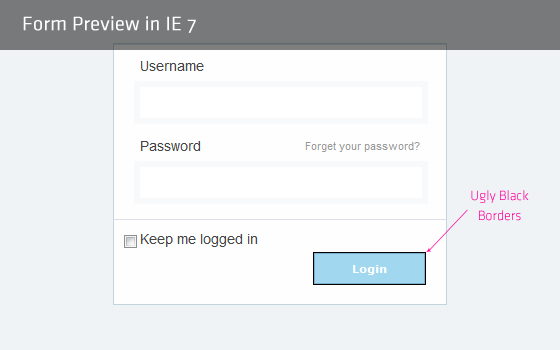
    The problem is there when a submit button is inside the form element. Click outside the form, form focus is gone,thus black border is gone. But form is focused when page loads so the problem exists there.

    IE7 Black border around input buttons

    Not working solution

    Every one suggest to add outline:none to fix this problem, since outline property is not supported by IE7, I say that this is a not working solution.

    Bullet proof Solution

    Just one property is required to get rid of this black border. Open you reset css file and add the these lines:

    input[type=submit],
    input[type=reset],
    input[type=button]
    {
           filter:chroma(color=#000000);
    }
    

    Why in reset css file?

    Because the problem is for all buttons in IE 7, since adding this fix in reset.css will fix our problem in entire site.

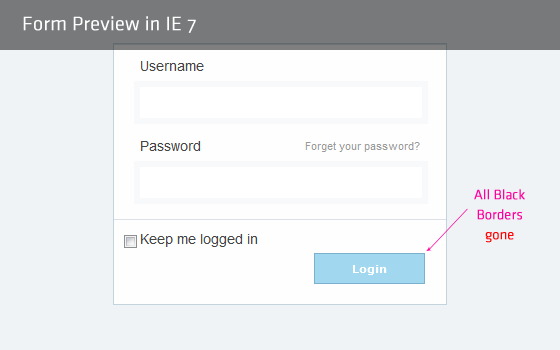
    That’s it. All black border is gone now. The fix is tried/tested against IE 7.

    Result

    Fixed IE7 Black border around input buttons

    Better if you put this fix in IE7-CSS file.

    Similar IE 7 Quick Trick

    How that sound to you? Isn’t it helpful :).
  • How to remove links dotted border in IE7?

    How to remove links dotted border in IE7?

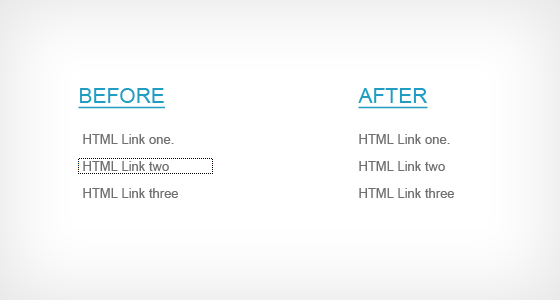
    Is your head spinning trying a:focus{outline:none;} to remove the dotted outlines in active links in IE7? Well mine was. After a long research and trying a lot test, I came to face a good, well worked trick to remove those ugly dotted borders.

    The myth

    Try out Googling on this topic and you ll find everyone is saying use this:

    	a:focus, *:focus {outline:none;}
    

    A never working fix for IE7.

    But hey, is that property supported in IE7? Simplest and fair answer is “No”. CSS ‘outline’ is not supported in IE7.

    Here you will find a quick trick how you can remove active links dotted outlines from IE7. (Sorry for recommending to use CSS expression, but this is the only solution for IE7.)

    The Solution

    Nothing more, just one lines in needed in your CSS, but its a CSS expression.

    a:focus, *:focus {
    	noFocusLine: expression(this.onFocus=this.blur());
    }
    

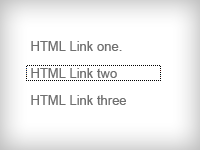
    Fix Dotted Borders in IE7


    Thats it. All those ugly dotted lines are gone. Its tested against IE7 only.

    Do you have another css trick on this? Share with me – comment it down.

  • Dark HTML CSS Template – Mega ICT Expo 2012 : Friday Freebie

    Dark HTML CSS Template Preview

    Time is to release our ‘Friday Freebie’ and we have HTML CSS Template for this week. I made this template for my college work, its about 6 months ago. I think, this template may be helpful to you, so here I come to give on today’s Friday Freebie.

    HTML Demo.

    Template contains a lot HTML pages, in which you might find some similar pages to each other also. This template usage <table> mark up and normal JavaScript functions.

    Why <TABLE>s?

    If you’re questioning me ‘Why <table>’s, my answer will be:
    My college’s guidelines to develop a site:

    1. Do not use DOCTYPE
    2. Use Plain HTML, less DIV elements as much as possible
    3. Use custom JavaScript functions, instead of plugins and libraries.

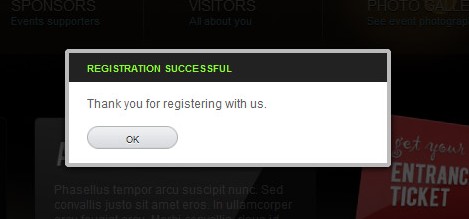
    Custom JavaScript Modal Window

    Get Template ZIP

    Though since I came to give this HTML/CSS Template for free, I have placed Doctype on all pages. Some visuals are enhanced by CSS3 also.

    Comming week will bring you extensive PSD Templates, so stay visiting, Subscribe RSS feed.
    Let me know, if this helped you, comment below.

  • We are re-designing!

    we are re-designing

    Hello guys,

    We are re-designing this blog to give a fantastic look. Finally a beta craft of logo is ready to share with you.  We will be back very soon with you guys with a lot of great stuffs.

    See full logo:

    clear-logo

    Your feedback on the logo is highly appreciated. See you later guys.

  • 10 Exceptional animated navigation menu around the web.

    Creating awesome navigation is challenging. Animated Navigation menu, even challenging. Your websites overall usability more depends on how you manage you main navigation menu.

    Here we are going to explore some of the best animated navigation menu around the web.

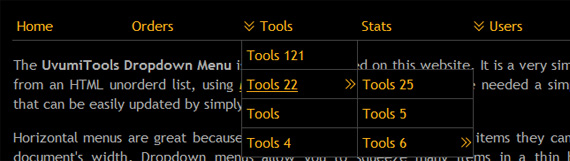
    a.)UvumiTools Dropdown Menu


    View (more…)

  • Create Tooltip using jQuery

    Create Tooltip using jQuery

    Tooltips are visually appealing, very user friendly way to notify users. Today we are going to make a tooltip using jQuery that you can use it anywhere in your webpage.
    While creating this tooltip, this is assumed that you are familier with html CSS. You need to know these techniques to understand the development.

    Pre-requirement

    For creating a visually appealing tooltip, we need following assets ready, (more…)